
This page documents one real, unedited 5-second AI zombie hug test render made from two reusable fictional sample photos. Inspect its exact prompt, settings, 30-credit charge, observed results and visible limitations below. It is one recorded generation, so it does not promise that another run will reproduce the same motion or faces.
In AI Zombie, Choose an example fills the generator with two sample character references and an editable story prompt. You can generate from that setup without uploading your own photos, change the scene, or replace the characters. Selecting an example is free; creating a new video requires sign-in and credits. These are usable inputs for your generation, rather than a button that only plays a demonstration video.
The sample people are fictional AI-generated adults. The pet reference is a golden retriever. Choose an example when you want to learn the controls before selecting personal photos, or when a fictional couple fits the story you want to tell.
Verified 5-Second AI Zombie Hug Test Render
The video below is the original, unedited output returned for this single AI Zombie Hug test. The same input images, exact prompt, settings, 30-credit charge, observed results and visible limitations are recorded here so you can inspect the evidence before generating your own version.
Generated October 9, 2026 at 06:05 UTC. The request was 5 seconds at 480P in 9:16 portrait and cost 30 credits. The returned MP4 is 480 × 832 pixels and 5.184 seconds according to its file metadata. Open the original MP4.
The two reference images

Image 1: fictional female survivor

Image 2: fictional male partner
Exact prompt and settings
Image 1 is a female survivor. Image 2 is her male partner with subtle, non-gory zombie makeup. On a misty path, they stand close together and slowly draw into one gentle hug. A single continuous 5-second portrait shot, soft dawn light, steady camera, and quiet wind. Emotional AI zombie hug, no violence or gore.| Setting | Value |
|---|---|
| Reference order | Woman first, man second |
| Requested length | 5 seconds |
| Resolution | 480P |
| Aspect ratio | 9:16 portrait |
| Prompt mode | Balanced |
| Safety filter | On |
| Site credit cost | 30 credits |
| Editing | None; original task output |
Results observed in this test render
- At 1.0 seconds, both characters are separate and recognizable from the input portraits, including hair and jacket colors.
- By 2.5 seconds, they move into the requested embrace while the camera remains a single, steady portrait shot.
- At 4.0 seconds, the hug is complete. The scene stays affectionate and non-gory, with no extra people or captions.
Static evidence at 1.0, 2.5 and 4.0 seconds
These three frames were extracted from the same unedited MP4 shown above. They make the reported motion and visible limitations inspectable without implying that the result is perfect.
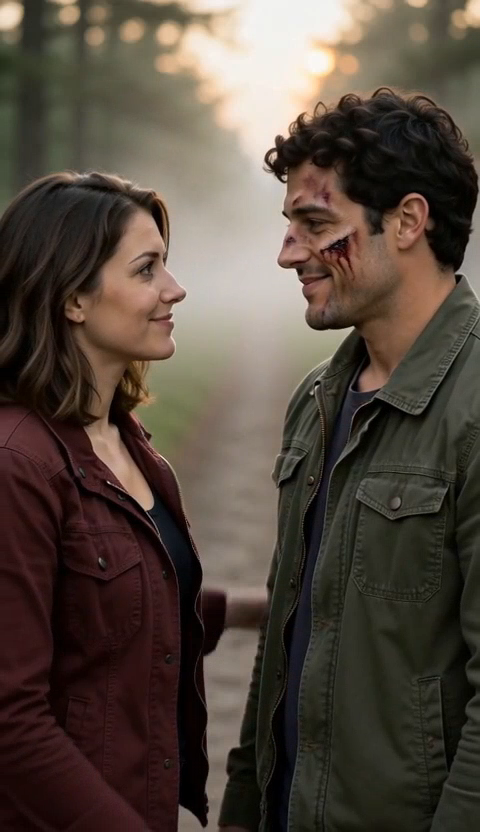
1.0s — Both characters are separate and recognizable.
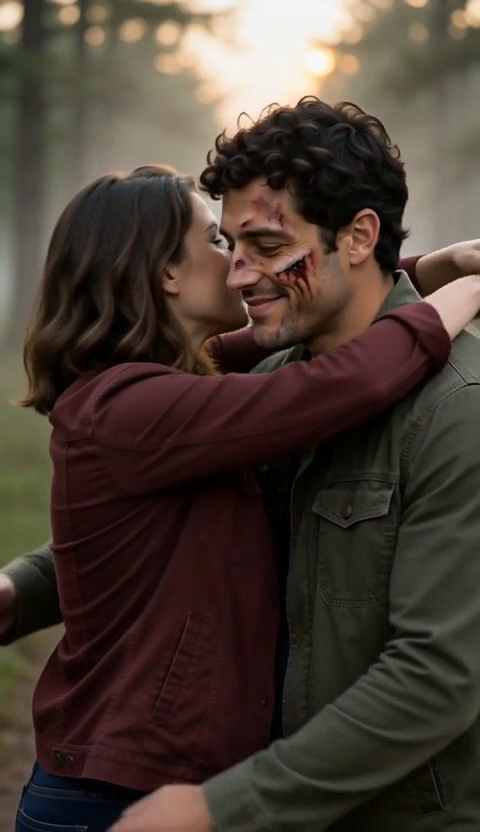
2.5s — The hug begins; the man's facial scratches are stronger than requested.
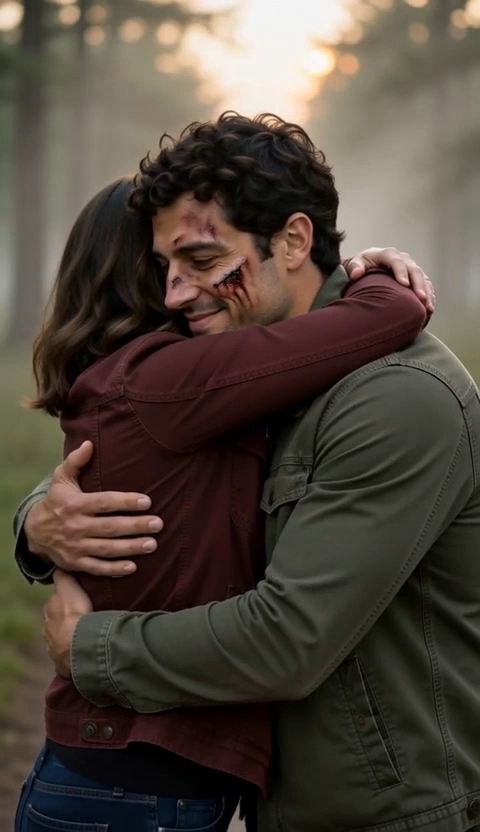
4.0s — The embrace is complete; most of the woman's face is hidden.
Limitations visible in the output
- The man's zombie effect includes several facial scratches, which is stronger than the prompt's phrase “subtle zombie makeup.”
- The final embrace hides most of the woman's face, so the result does not keep both faces visible through the last frame.
- This is one documented generation, not a promise that another run or different photos will reproduce the same motion or identity consistency.
If keeping both faces visible matters, change the final action to “a side-by-side shoulder embrace with both faces toward camera,” then compare the new output with this baseline. The troubleshooting guide explains how to reduce merged roles and identity drift.
Which AI zombie examples can I choose?
The generator has three choices:
| Example | Photo 1: survivor | Photo 2: loved one | Starting action |
|---|---|---|---|
| Zombie Love Story | Man | Woman | Recognize each other and hold hands on a rainy street. |
| AI Zombie Hug | Woman | Man | Move into a gentle hug on a misty path. |
| Zombie Pet Reunion | Woman | Golden retriever | The kneeling survivor offers a hand and the dog nuzzles it. |
The love story and hug use the same two fictional people in a different order. The first reference remains the survivor; the second receives the subtle zombie appearance. The pet example changes the second character to a dog, rather than asking a human reference to become an animal.
The pictures identify characters. They are not the required opening and closing frames of the video. Read the two-photo reference guide if you are used to tools that animate between a first and last image.
How do I generate from an example?
- Open the AI Zombie generator and find Choose an example.
- Click the story you want. Check the two pictures under Your characters and the text in Story prompt.
- Keep the starting prompt for a short version, or edit one detail such as the location or gesture.
- Review duration, resolution, aspect ratio and the displayed credit cost.
- Sign in, make sure you have enough credits, and click Generate AI Zombie Video.
Selecting an example loads 5 seconds, 480P, 9:16 and the balanced prompt setting. That starting generation uses 30 credits. If you want a longer scene, change the duration after choosing the example and update any “5-second” wording in its prompt to match.
Choosing another example reloads its photos and prompt and restores those starting settings. Finish selecting your example before you make detailed edits. While generation or a photo upload is in progress, example selection is unavailable.
What can I change without uploading photos?
You can keep both sample characters and change the scene in the prompt. For the love story, try a quiet doorway instead of the rainy street. For the hug, begin with the pair already close together. For the dog, keep the person kneeling so the nuzzle has a natural meeting point.
Here is an original variation for the sample love story pair:
Image 1 is the male survivor. Image 2 is his female partner, with subtle pale zombie makeup and no injuries. They stand close together under a sheltered doorway at dusk. He recognizes her, smiles softly and gently takes her hand. She returns the small smile. Keep both reference identities distinct and both faces visible. One steady medium portrait shot, quiet evening ambience and unhurried movement. No other people, captions or violence.This single gesture suits a five-second draft. For an approach followed by an embrace, choose a longer duration and follow the step-by-step zombie video guide. Writing more events into the prompt does not create a longer clip; the duration control sets its length.
How do I replace the example characters?
Under Your characters, hover over a picture or focus its replacement button, then select a new photo. Replacing it in place keeps the role order. If you clear the pictures instead, add the survivor first and the loved one second. Update gender, relationship and appearance details in the prompt so they match the new references.
For a personalized couple, replace both sample portraits. For your own dog reunion, replace the pet photo and, if desired, the person. To make a cat version, replace the golden retriever reference with a cat photo and change the action to a head rub. The pet reunion guide includes separate dog and cat prompts.
How much does an example generation cost?
Examples use the same pricing as your own photos: 6 credits per second at 480P or 10 at 768P, for whole-second durations from 5 to 15 seconds.
| Settings | Credits for one generation |
|---|---|
| Default example: 5 seconds, 480P | 30 |
| 10 seconds, 480P | 60 |
| 15 seconds, 768P | 150 |
The one-time packs are $6.90 for 150 credits, $14.90 for 450, and $39.90 for 1,500. They do not auto-renew and the credits do not expire. Each new generation consumes credits, including a new version after changing an example prompt. The cost guide explains how to budget several attempts.
Quick questions
Does “No upload needed” mean free video generation?
It means the example supplies usable reference photos. Choosing it does not spend credits; submitting a generation does. Check the cost next to the generation button.
Is choosing an example the same as watching a finished sample?
No. Selecting the card prepares a new video request with editable inputs. The documented video above is a separate, real output made from the same built-in hug inputs; it does not replace your own new generation.
Can I select the same example again?
Yes. Selecting it again restores its reference pair, starting prompt and default settings, so you can start a different version.